Using the GitHub Copilot canvas to show session costs
My first play with extensions in the GitHub Copilot app

The GitHub Copilot App uses a canvas to surface information useful to the current session, for instance file changes and the current pull request.
It’s one of my favourite parts of the app, because it lets you stay in the zone by bringing together parts of the engineering flow.
Did you know this canvas can be extended? You can use it to host interactive experiences and information panels which your agent can view and optionally interact with (so yes, you can play rock-paper-scissors with your preferred model in the Copilot App 😉).
Session costs
The example below is my first go with extensions, I’m surfacing the costs for Copilot App sessions on my machine.
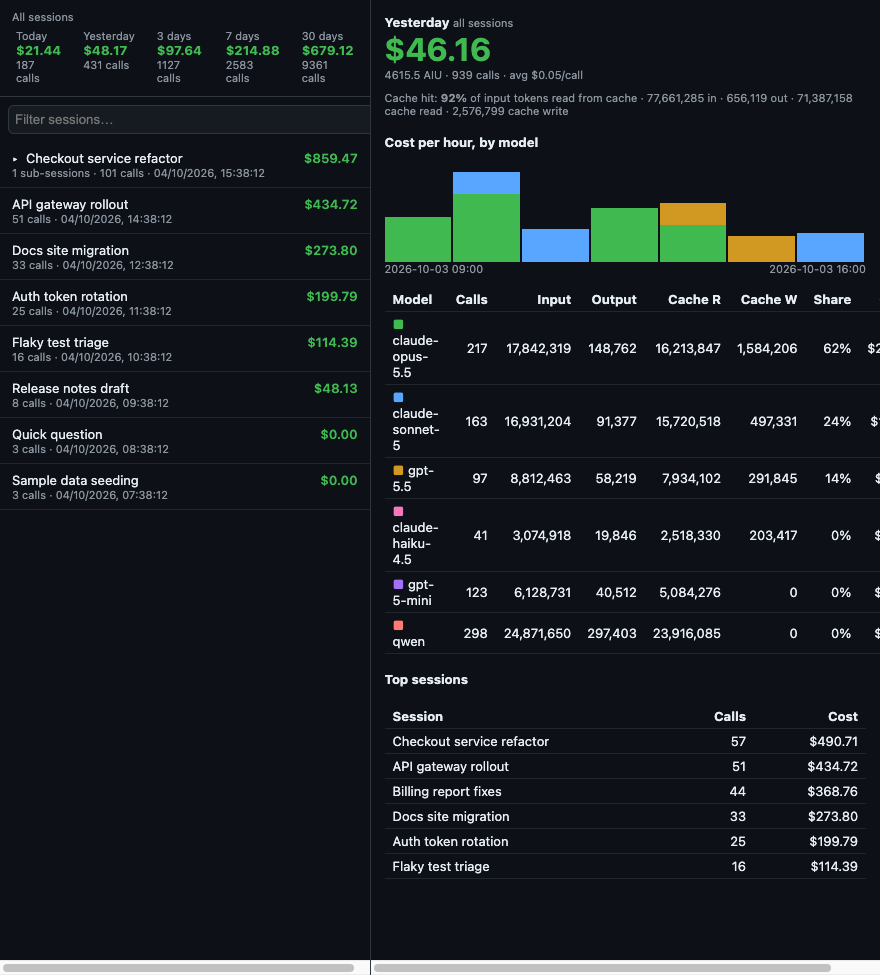 The data is fake, but the look is real :-)
It works by querying the local store (sqlite) in the GitHub Copilot app.
It gives me an at-a-glance view of my recent and short-term spend, model usage, reads, writes, and caching. I can quickly get a handle for which projects are burning tokens, and there’s some simple projection logic to guess future burn rate.
If you’re using sub-sessions heavily, as I do, it understands these and groups them together.
Once it is installed, it is available from any canvas.
No data leaves your machine, it does not make model requests, so using the dashboard does not consume tokens.
Installing
Easy as! They can be hosted in a GitHub repository and installed by pointing the Copilot App to its URL. When installing, you choose if you want it scoped to the user, project or session.
From the project readme:
- Open the Canvas (right hand) pane → Press ‘+’ -> Canvas -> Import canvas from gist/URL
- Paste https://github.com/kewalaka/copilot-session-costs
- Choose scope. I chose User so it is available from any canvas page.
How does it work?
The extension is a JavaScript ES Module, the entry point is extension.mjs.
On Unix-like systems user-scoped extensions are stored in ~/.copilot/extensions.
Caveats
This is a usage dashboard not a billing statement, it relies on metadata in the Copilot store. Treat it as a guide.
As an example, I’ve noted my APIM gateway-backed sessions are zero. I’m not sure if that’s something I can surface, feedback welcome.
The README.md lists a few more caveats.
Try it out
You can find the extension in the copilot-session-costs repository.
The README.md has instructions, let me know whether you find it useful, or raise issues for feedback!